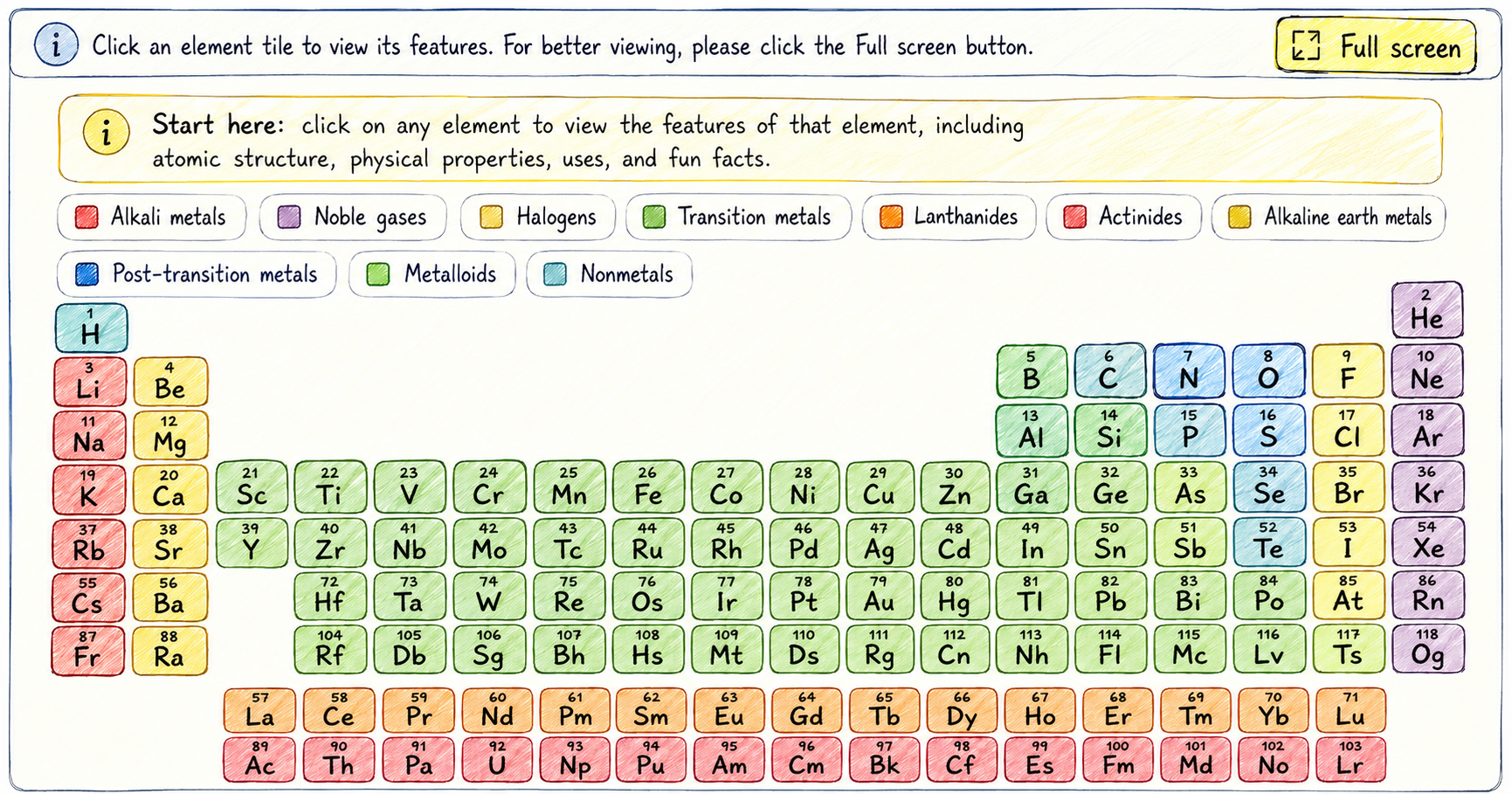
Explore the interactive periodic table of elements by clicking any element tile. The tool shows quick facts, atomic structure, electron configuration, physical properties, real-life uses, fun facts, and related chemistry articles.
How to use the interactive periodic table of elements
Start by choosing an element from the colorful table. The side panel opens with the element name, symbol, atomic number, atomic mass, and learning details. Try Oxygen first, then compare it with nearby elements such as Nitrogen, Fluorine, and Sulfur.
Choose an element
Click a tile such as O for Oxygen, Fe for Iron, or Au for Gold.
Read quick info
Check the symbol, atomic number, atomic mass, phase, and category.
Study atomic structure
Look at protons, neutrons, electrons, shells, and electron configuration.
Connect to real life
Use the real-life uses, fun facts, and related articles to keep learning.
What do the periodic table colors mean?
The tool uses color categories to help learners notice families of elements. Alkali metals, noble gases, halogens, transition metals, lanthanides, and actinides each have their own color, so patterns are easier to compare. The category labels are clickable and open a short Wikipedia-based explanation.
Learning tip: click one element from a category, then click another from the same category. Compare the phase, atomic mass, electron shells, electron affinity, ionization energy, and summary to see what changes.
Oxygen example
When you click Oxygen, the panel shows symbol O, atomic number 8, and atomic mass 15.999. Its atomic structure shows 8 protons, about 8 neutrons, 8 electrons, and the electron configuration 1s2 2s2 2p4.
Oxygen is connected with breathing, medical oxygen, steel manufacturing, Earth’s atmosphere, rust, and oxidation.
Key terms for young chemists
Atomic number
The atomic number tells how many protons are in the nucleus of an atom.
Atomic mass
Atomic mass is the average mass of atoms of that element, based on its isotopes.
Electron configuration
Electron configuration shows how electrons are arranged in energy levels and orbitals.
Element category
Categories group elements with similar behavior, such as noble gases or halogens.
Frequently asked questions
What is an interactive periodic table of elements?
It is a clickable periodic table that lets learners explore each element instead of only reading a static chart.
What information appears when I click an element?
The tool shows quick info, atomic structure, electron configuration, melting point, boiling point, density, uses, fun facts, and article links.
Why are the elements different colors?
Colors show element families and categories, including alkali metals, noble gases, halogens, transition metals, lanthanides, and actinides.
How are neutrons estimated in the tool?
The tool rounds the atomic mass to the nearest whole number and subtracts the atomic number. This gives a beginner-friendly estimate.